



Material & Texture Overview – heavy wavy glass
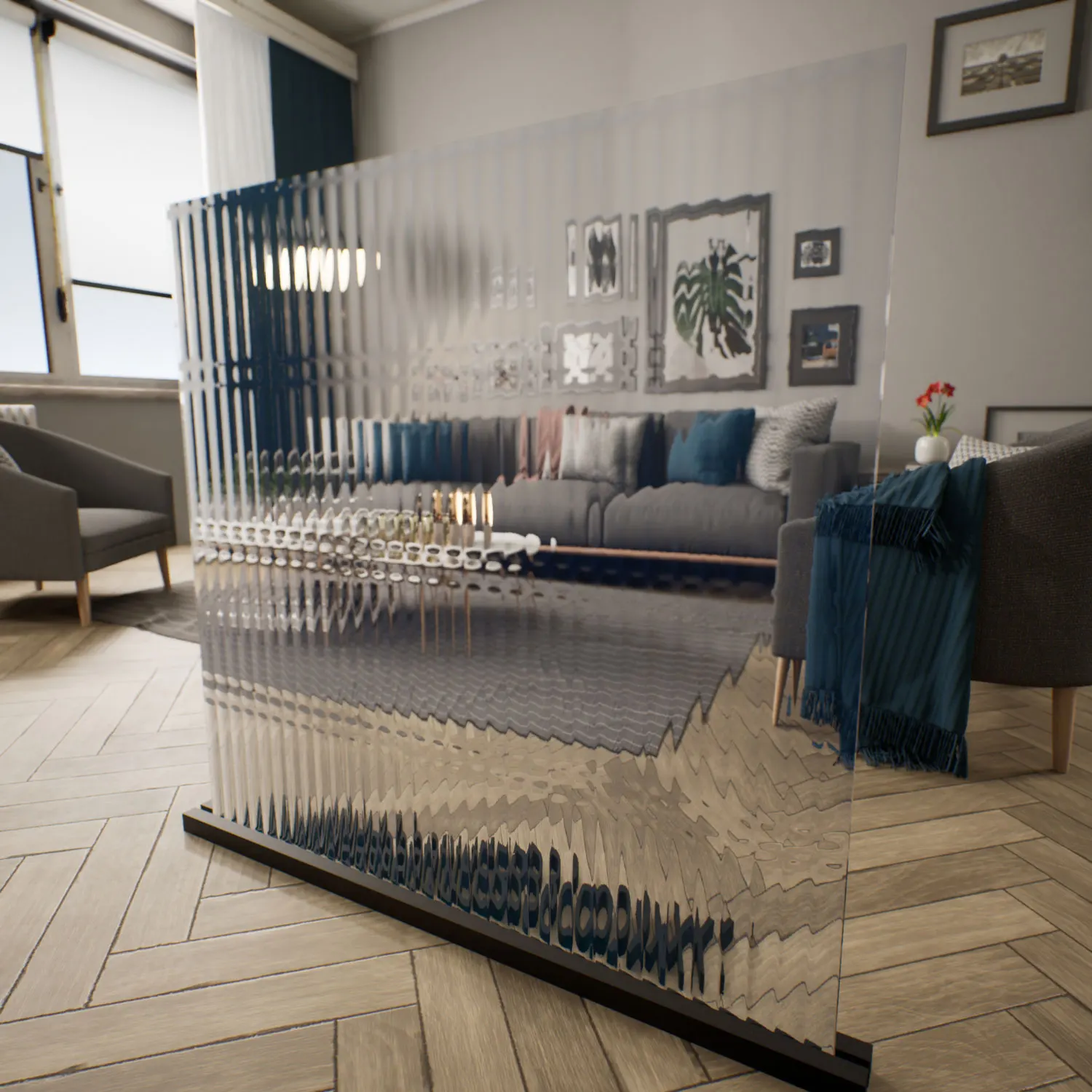
The heavy wavy glass Unreal Engine material represents a category of decorative architectural glass designed to diffuse visibility while maintaining strong light transmission. Unlike flat transparent panels, this surface introduces strong optical distortion through deep wave-like relief and high refraction values. The result is a pane that bends and stretches the view behind it, turning silhouettes and shapes into soft, abstract forms rather than clear outlines.

Visually, the glass sits somewhere between transparency and opacity. Background elements remain visible but are heavily transformed by the surface relief. The pattern resembles irregular ripples on water or cast glass panels produced through semi‑controlled molding processes. Because the distortion varies across the surface, reflections appear as elongated streaks rather than sharp mirror highlights. This behavior gives the heavy wavy glass Unreal Engine material a subtle sense of movement when the camera angle changes.
Color-wise, the material leans toward a neutral light‑grey base, allowing it to integrate easily with most architectural palettes. Environmental reflections introduce cool undertones—soft silver, deep blue, and occasionally steel‑like highlights—especially along raised sections of the surface. This neutrality makes the glass adaptable to both minimal contemporary interiors and more expressive architectural scenes.
Where This Material Works Best
In real-world architecture, glass with strong distortion like this is often used when privacy and daylight need to coexist. Interior partitions in offices are a common example. Instead of blocking light with opaque panels, designers install textured glass that maintains brightness while preventing clear visual access between spaces. The heavy wavy glass Unreal Engine material recreates that same behavior in digital environments.
Residential interiors benefit from similar applications. Bathroom windows, stairwell glazing, and internal doors often rely on wavy or cast glass to soften visibility without making the space feel enclosed. In ArchViz projects, this material helps simulate realistic architectural glazing that feels believable in modern residential or hospitality designs.
Retail spaces also use this type of glass for display environments. When applied to decorative storefront panels or feature partitions, the distortion subtly captures light and reflections from surrounding objects, creating an engaging surface without overwhelming the design. For real‑time projects and interactive experiences, the wavy textured glass UE material can add visual complexity to otherwise simple architectural surfaces.
Rendering Characteristics & Technical Notes
From a rendering perspective, this material relies on a combination of strong normal relief and controlled refraction. The distortion is deep enough to noticeably reshape reflections and background objects, but still calibrated to keep lighting interactions physically believable.
Because the surface roughness remains low, highlights stay bright and glass‑like. However, due to the uneven geometry simulated by the normal map, these highlights break into scattered reflections instead of forming perfect mirror streaks. This behavior is essential for achieving the look of wavy textured glass UE used in architectural design.
To improve realism in close‑up shots, small imperfections can be introduced. Subtle micro‑scratches on the glossy surface, faint fingerprints near edges, or barely visible dust accumulation along the lower frame all contribute to breaking the digital uniformity. Slight variations in wave depth across the surface can also help simulate real manufacturing irregularities.
Ready‑Made Setup for Unreal Engine
This asset is delivered as a ready-made glass shader Unreal configuration built specifically for Unreal Engine workflows. The PBR values, refraction behavior, and reflection response are already tuned to work with real‑time lighting systems and modern Unreal rendering pipelines.
Instead of constructing a complex material graph manually, artists can simply apply the ready-made glass shader Unreal to any mesh surface. Parameters such as distortion strength, reflection balance, and color tint remain adjustable through material instances, allowing quick iteration across multiple scenes.
For production environments—especially ArchViz and cinematic real‑time projects—this ready-made glass shader Unreal helps reduce setup time while maintaining consistent visual behavior across different lighting conditions.
Accessing the Material
This material and the rest of the library are available through the lightweight AfterBox desktop application (around 16MB). After browsing the library, users can import the wavy textured glass UE asset directly into Unreal Engine using a simple drag‑and‑drop workflow.
Because the shader is already configured and tested, artists can skip the usual cycle of shader setup, refraction calibration, and render experimentation. Instead, the material can immediately be integrated into production scenes, allowing more time to focus on lighting, composition, and storytelling within the project.
More details about subscription access can be found here:
Save time on material setup
Instead of downloading this texture, use the optimized ready-made material for V-Ray, Corona Renderer (3ds Max) and Unreal Engine available in AfterBox.No manual setup


