
 Build Faster with AfterBox
Access over 4000 ready-to-use materials for Unreal Engine, V-Ray and Corona.
Create your account and receive $12 free credit.
Introduction: V-Ray vs Corona Renderer
Choosing the right rendering engine for your 3D workflow can make or break your project deadlines. When professionals debate V-Ray vs Corona Renderer, they are often comparing two heavyweights developed by the exact same parent company, Chaos. Yet, despite sharing core technology under the hood, these two renderers approach visualization with completely different philosophies. Understanding these differences helps you decide which tool fits your daily production needs best.
V-Ray vs Corona: One Company, Two Philosophies
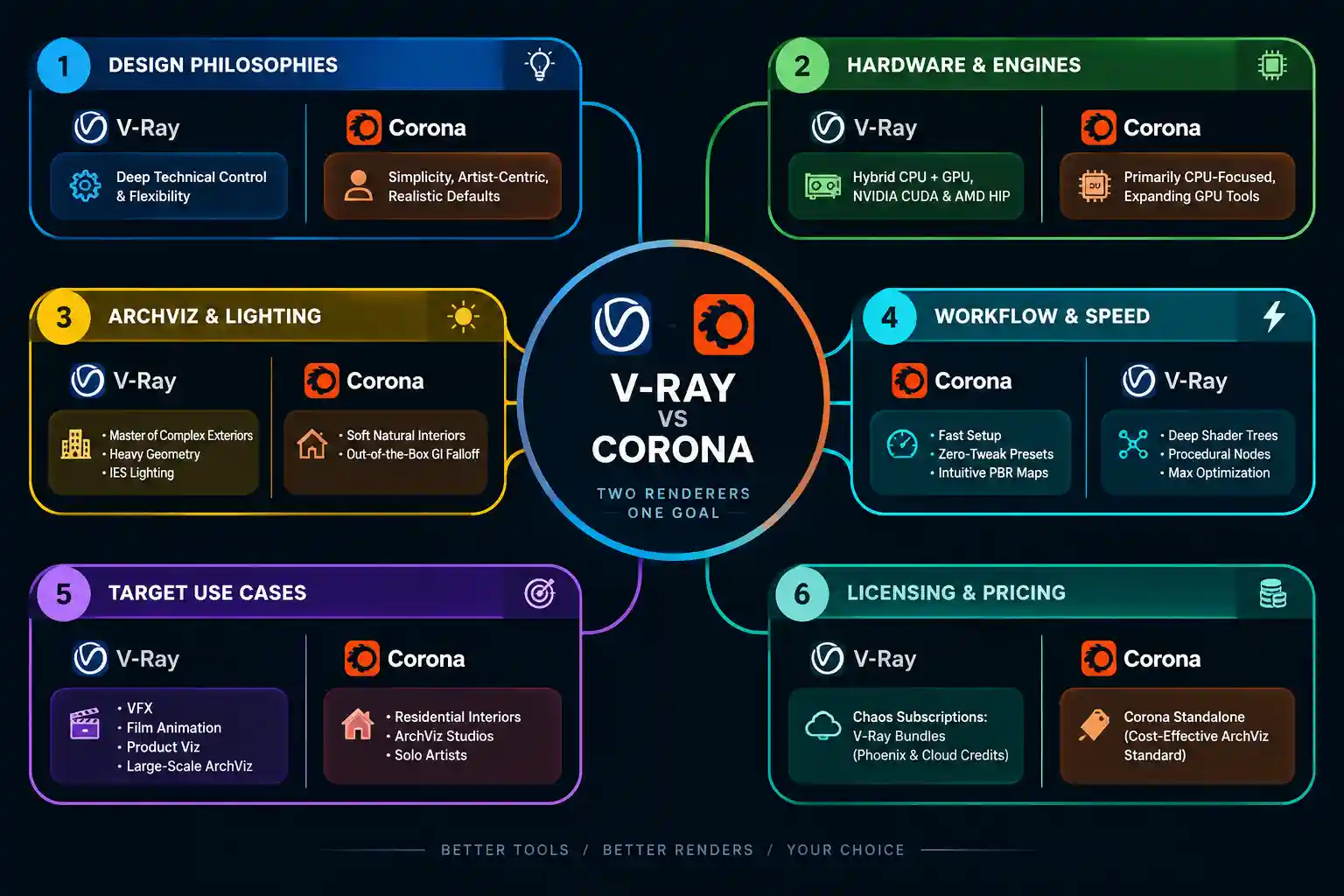
Both renderers share DNA from Chaos, but their design goals diverge sharply. V-Ray is built around ultimate control, extreme flexibility, and deep technical parameters. It lets technical directors tweak almost every ray-tracing calculation. Corona Renderer, on the other hand, focuses on simplicity and natural defaults. It aims to let artists focus entirely on composition and lighting without digging into complex render settings.
Which Is Faster, Corona or V-Ray?
Render speed depends heavily on the scene complexity and the hardware you use. Corona is famously fast to set up because its default settings require almost no adjustment for clean interior shots. V-Ray can match or beat Corona’s raw calculation speeds when tuned correctly, but it demands more initial configuration time. For rapid iterations, many studios rely on a structured pre-made material library to speed up texturing across both engines.
V-Ray vs Corona for Archviz Interiors
When working on architectural visualization interiors, Corona has long been a favorite for residential spaces. Its handling of global illumination and physical light falloff creates soft, natural lighting out of the box. However, V-Ray handles complex exterior and interior scenes with equal mastery, especially when dealing with heavy geometry and multi-layered glass. For accentuating architectural features, integrating an IES light profile correctly is critical in both engines to simulate real-world bulb distributions accurately.
Looking for a Faster Workflow?
Instead of creating every material manually, use a library of over 4000 ready-to-use materials and import them into your projects in seconds.
CPU vs GPU Rendering: V-Ray’s Hybrid Advantage
Historically, Corona was strictly a CPU-based powerhouse, while V-Ray offered robust GPU acceleration alongside CPU rendering. With current releases like Chaos Corona 15 and V-Ray 7 Update 3, the landscape has evolved. V-Ray 7 Update 3 notably restored AMD GPU support via HIP, giving users immense flexibility across hardware configurations. Corona also expands its GPU utility, but V-Ray remains the definitive choice for hybrid rendering setups that leverage both CPU and GPU simultaneously.
Workflow Speed and Material Compatibility
Material workflow is where real-world production bottlenecks appear. When importing third-party PBR material libraries, Corona translates maps intuitively with minimal color-correction tweaks needed. V-Ray provides advanced shader trees that allow precise mapping adjustments, bump filtering, and procedural texture layering. For artists utilizing 3ds Max workflows, specialized plugins like Corona Renderer assets and V-Ray shaders offer dedicated optimization that bridges compatibility gaps instantly.

Licensing Cost Comparison
Budgeting for software licenses is a major consideration for solo artists and growing agencies alike. Both engines utilize Chaos subscription models, meaning you pay an annual or monthly fee rather than buying perpetual licenses. V-Ray often comes bundled in collection tiers that include extra utilities like Phoenix or Chaos Cloud credits. Corona is typically offered as a standalone subscription, making it slightly more budget-friendly for pure interior design studios that do not need advanced VFX toolsets.
Summary Comparison Table
| Feature | V-Ray | Corona Renderer |
|---|---|---|
| Primary Philosophy | Maximum control and technical flexibility | Simplicity and realistic defaults |
| Best Use Cases | VFX, product design, archviz, animation | Residential archviz, interior design |
| Hardware Support | Robust CPU and GPU (including AMD HIP) | Primarily CPU-focused with expanding GPU tools |
| Learning Curve | Moderate to steep | Fast and intuitive |
| Lighting Setup | Advanced controls and parameters | Natural falloff with minimal tweaking |
