
 Build Faster with AfterBox
Access over 4000 ready-to-use materials for Unreal Engine, V-Ray and Corona.
Create your account and receive $12 free credit.

When diving into the world of architectural visualization, artists often encounter a multitude of software options and rendering engines. Among these, Corona Renderer has established a prominent reputation for creating photorealistic images with remarkable ease. If you have ever wondered what makes this rendering software unique, this guide will walk you through its core mechanics, background, and practical applications in plain terms.
What Is Corona Renderer?
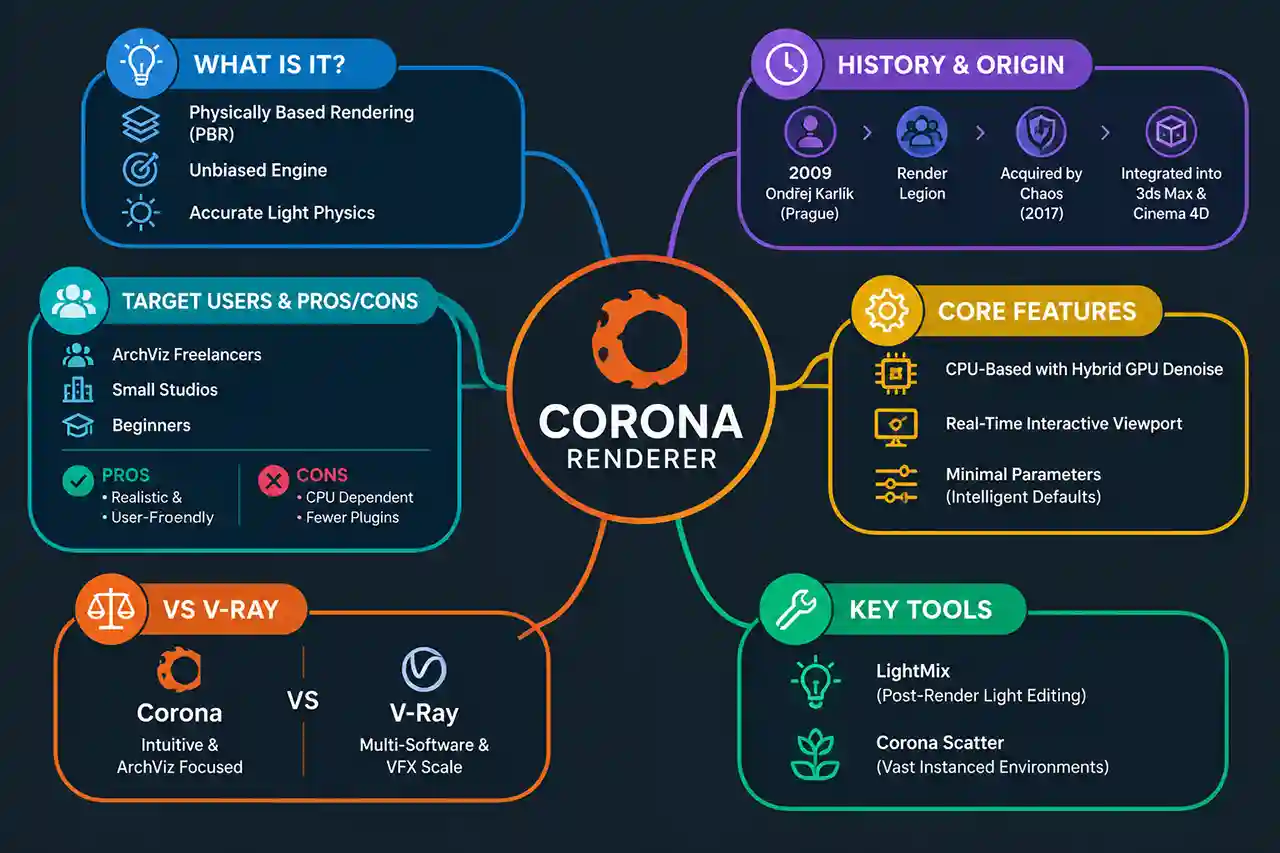
At its core, Corona Renderer is a high-performance, high-quality production rendering software designed for modern visualization tasks. To understand what it does, it helps to look at the underlying technology. Corona Renderer is a physically based, unbiased rendering engine. In simple terms, physically based rendering (PBR) means the software simulates real-world physics—such as how light bounces off surfaces, refracts through glass, and absorbs into materials—to generate images that mimic real photography.
Being an unbiased renderer means the software calculates light paths using mathematical algorithms that do not introduce intentional bias or approximations to speed up the process. This guarantees a high level of physical accuracy. When light hits a wall, the engine traces its exact physical behavior until it dissipates, resulting in realistic shadows, bleeding colors, and natural illumination without requiring complex technical workarounds.
Background of Corona Renderer
The development of Corona Renderer began as a solo academic project by Ondřej Karlík in 2009 in Prague. Over time, it evolved into a fully commercial product developed by Render Legion. In 2017, Chaos—the company behind the industry-standard V-Ray renderer—acquired Chaos Czech, the team behind Corona. Today, it is developed primarily as an integrated plugin built specifically for major 3ds Max and Cinema 4D workflows, offering deep integration into these professional environments while maintaining its distinct operational philosophy.
Core Practical Characteristics
Corona Renderer stands out in the 3D industry due to several defining technical characteristics. These features set it apart from older rendering engines that often demand extensive technical tweaking to yield clean results.
CPU-Based with Growing Hybrid Support
Historically, Corona Renderer is a CPU-based rendering engine. It relies heavily on the processing power of your computer’s central processing unit to calculate complex lighting scenarios. However, modern versions also incorporate GPU-based features, particularly for denoising and interactive rendering previews, blending traditional CPU reliability with modern hybrid processing capabilities.
Interactive Real-Time Preview
One of the most praised features of Corona Renderer is its interactive rendering mode. As you adjust lights, move objects, or tweak material settings, the viewport updates almost instantly. This real-time feedback loop allows artists to evaluate composition, exposure, and color balance on the fly, eliminating the traditional guesswork of setting up a scene and waiting minutes for a test render.
Minimal-Parameter Setup
Older rendering engines often required artists to fiddle with dozens of technical settings, sampling values, and ray-tracing depths to clean up noise and achieve a good image. Corona Renderer was designed from the ground up to minimize technical parameters. Most settings have intelligent defaults, allowing users to focus on artistic choices like framing, lighting, and textures rather than troubleshooting rendering math.
LightMix and Scatter Tools
Corona introduced groundbreaking productivity tools that have since been adopted by other engines. LightMix allows artists to adjust the color and intensity of individual lights after the render has completely finished, without needing to re-render the scene. Meanwhile, Corona Scatter lets users populate vast landscapes with millions of objects, such as trees, grass, or rocks, using minimal memory and simple controls.

Corona Renderer vs V-Ray: A Factual Comparison
Both Corona Renderer and V-Ray are owned by Chaos and serve the architectural visualization market, yet they cater to different workflows. The table below outlines their objective differences based on usability, target use cases, and software support.
| Feature | Corona Renderer | V-Ray |
|---|---|---|
| Ease of Use | Designed for minimal parameter tweaking; highly intuitive for beginners. | Powerful and flexible, but features a steeper learning curve with more advanced settings. |
| Typical Use Case | Architectural visualization, interior design, product rendering. | Vast range including archviz, VFX, film production, and heavy industrial design. |
| Supported Software | Primarily 3ds Max and Cinema 4D. | 3ds Max, Cinema 4D, Maya, Houdini, Blender, Revit, Rhino, Unreal, and more. |
Who Is Corona Renderer Best Suited For?
Understanding who benefits most from Corona Renderer helps determine if it fits your specific workflow requirements.
Archviz Freelancers
Architectural visualization freelancers often work under tight project deadlines. Because Corona Renderer prioritizes fast scene setup and predictable results, solo artists can produce high-end photorealistic interior and exterior renders efficiently without spending hours troubleshooting technical rendering errors.
Small Studios
Small design and visualization studios benefit from the intuitive nature of Corona Renderer. The software allows team members with varying technical skill levels to achieve consistent visual quality, streamlining the pipeline from 3D modeling to final client presentation.
Beginners
For newcomers entering the world of 3D rendering, traditional engines can feel intimidating. Corona Renderer provides a gentle learning curve. Its physically based approach means that if a material looks correct in the real world, setting it up in Corona follows the same intuitive logic.
Pros and Cons of Corona Renderer
Every software has strengths and limitations. Reviewing these points provides a balanced perspective before adopting the engine.
- Pros: Extremely user-friendly interface with minimal technical parameters.
- Pros: Powerful LightMix feature saves hours of re-rendering time.
- Pros: Exceptional out-of-the-box physical realism for interior lighting.
- Pros: Highly responsive interactive viewport rendering.
- Cons: Limited software integration compared to universal engines like V-Ray.
- Cons: Primarily relies on CPU power, requiring high-end workstation hardware for large scenes.
