



Introducing the Multi-Stemmed Tropical Palm Asset
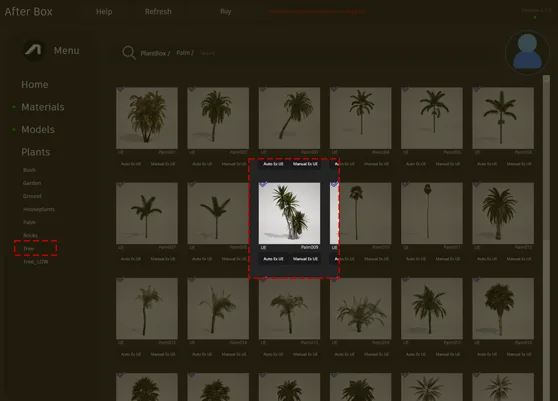
This free 3D palm asset offers a versatile, clumping form that works effectively as a foundation for various green spaces. Standing between 1.5 and 2.5 meters tall, the model features three distinct woody, fibrous trunks with realistic grey-brown textures. The foliage consists of stiff, sword-shaped leaves in shades of dark and olive green, reminiscent in its structural silhouette to a Yucca or Dracaena-like palm. It is an excellent choice for designers looking to balance natural density with clean, modern lines in their Unreal Engine projects.
# Versatile Applications in Visualization and Games
Because of its upright, clumping growth habit, this asset serves as an ideal focal point for contemporary courtyards or a refined accent in minimalist lobby designs. In exterior architectural visualization, it pairs perfectly with hardscape elements like white gravel, smooth concrete pavers, or polished boulders. Game environment artists will find it useful for populating tropical island biomes or adding character to abandoned, overgrown city scenes where a drought-tolerant aesthetic is required. Whether you are staging a modern residential entryway or a high-end outdoor cafe, this plant helps ground your scene with authentic detail.
# Environmental and Design Suitability
This plant is best suited for climates that lean toward tropical, subtropical, or arid conditions. Its evergreen nature ensures it looks consistent year-round, making it a reliable choice for static renders or time-of-day light studies. It is particularly effective in xeriscaping or low-maintenance garden styles that prioritize drought-tolerant species. While it thrives in modern and brutalist architecture, we recommend avoiding it in dense, lush temperate woodland environments, as the specific structural silhouette is more synonymous with warmer, dryer regions. When considering your site plan, look into the coastal landscape palm model for secondary vegetation layers that complement this species.
# Technical Performance in Unreal Engine 5
Technical efficiency is at the core of this asset. With a poly count of 44,528 triangles, it is optimized for high-quality production without sacrificing performance. Because it is fully compatible with Nanite, you do not need to concern yourself with manual LOD authoring. The engine handles the level-of-detail transitions automatically, allowing for seamless integration even when populating large-scale scenes. The trunk texturing is designed for mid-range viewing, where the material detail provides necessary visual weight. As with many procedural landscape tools, you should adjust the lighting and surface settings to match your project’s global illumination.

# Scattering and Realism for Natural Variation
To achieve a professional finish, avoid placing identical instances of this plant side-by-side. Because this model features a distinct three-trunk silhouette, the repetition risk is moderate if the rotation remains uniform. Use the Unreal Engine foliage tool to randomize both the scale and the Z-axis rotation for every instance. Mixing this model with other, smaller ground-cover vegetation will help break up the base of the stems, further masking the geometry and increasing the perceived complexity of the scene.
# Optimized Unreal Engine Integration
This palm asset is designed for a drag-and-drop workflow, saving you significant time during the assembly phase of your environment. Once imported into your content browser, you can place it directly into your scene as a static mesh. The materials are already configured for realistic light response, meaning you spend less time tweaking shaders and more time focusing on composition, cinematic camera placement, or gameplay design.
# Efficient Asset Management
By utilizing pre-optimized foliage, you can populate extensive architectural scenes or game levels without inflating your project size. This ready-made asset allows you to maintain high visual standards across your portfolio. For studios looking to scale their production pipeline, more information about our professional library and subscription plans can be found at https://after-box.com/pricing/.


Save time importing objects
Download this object and hundreds of others from Afterbox software right now and import it into your Unreal Engine project with one click.
