




Context & Visual Identity – Light Wood Veneer Texture
This light wood veneer texture represents processed panel wood typically specified in contemporary interiors. The surface is clean, vertically structured, and tonally controlled. Subtle fibre lines run in a consistent direction, creating order without visual noise.
The pale yellow-beige tone sits close to natural oak veneer used in Scandinavian and Japanese-inspired spaces. It reflects light softly and enhances the perception of openness. Because the variation is restrained, the material supports minimal compositions rather than dominating them.

A narrow central seam visible in the diffuse layer reinforces the feeling of panel-based construction. In practice, this makes the surface particularly suitable for cabinetry, built-in storage, and modular wall systems where veneer sheets are joined deliberately.
The overall impression is lightweight, precise, and architectural.
Typical Problems This Veneer Panel Wood Solves
In many archviz projects, light wood surfaces tend to look either flat or overly saturated. When grain contrast is too strong, minimal interiors lose clarity. This veneer panel wood avoids that issue through controlled tonal shifts and fine linear texture.
Another recurring issue is unrealistic gloss. Untreated wood should not behave like polished lacquer. Here, the subtle satin finish ensures that reflections remain restrained. Highlights appear only at grazing angles, maintaining material credibility.
Tiling repetition is often visible in large vertical wall panels. Since this material is seamless and structurally consistent, it performs reliably across extended surfaces without obvious pattern breaks.
Practical Use Cases – Pale Oak Veneer in Architecture
This 8K wood veneer PBR is well suited for:
Interior wall panels
Cabinet fronts and wardrobes
Minimal desks and tables
Built-in shelving systems
Scandinavian residential projects
Japanese-inspired interiors
Real-time architectural visualization
In apartment projects, it works effectively behind open shelving or as full-height cabinetry. The vertical grain supports ceiling height and emphasizes spatial proportions.
In commercial interiors such as offices or showrooms, the material introduces warmth without distracting from furniture or branding elements. For game environments or real-time applications, the neutral tone integrates easily into modern scenes.
Because the fibre detail is precise but not aggressive, the surface holds up in close-up camera angles.
Rendering & Realism Notes – 8K Wood Veneer PBR
Delivered at 8096×4096 resolution, this wood veneer texture retains micro-fibre clarity in detailed shots. The normal and roughness maps are calibrated to maintain subtle surface depth rather than exaggerated relief.
The satin finish plays an important role in realism. Under soft daylight, the material diffuses light evenly. Under directional artificial lighting, a gentle highlight forms along the grain direction. This behaviour is consistent with sealed veneer panels used in built interiors.
As a result, the material performs predictably across still images, animations, and walkthroughs.
Render Engine Compatibility – Wood Veneer for Unreal, V-Ray, Corona
This light yellow wood veneer texture integrates smoothly into Unreal Engine, V-Ray, and Corona Renderer. In Unreal, it connects directly to standard PBR inputs for real-time projects. In V-Ray and Corona within 3ds Max, reflection and roughness values translate accurately without complex shader rebuilding. The texture maps are also usable in any PBR-based rendering workflow.
Workflow Advantage with AfterBox
All materials are accessible through the lightweight AfterBox application (approximately 16MB).
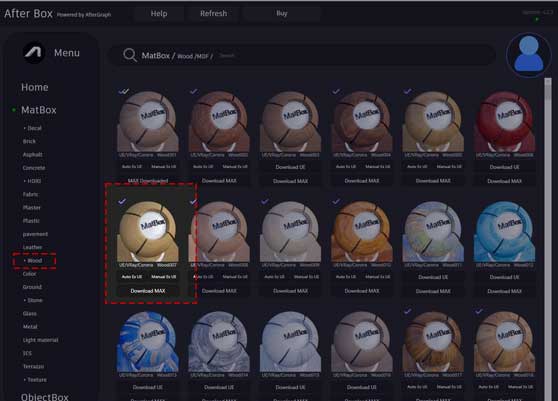
Users can drag and drop the prepared veneer material directly into Unreal Engine or into V-Ray and Corona in 3ds Max.
This approach minimizes manual node setup and ensures consistent material calibration across projects. Instead of rebuilding shaders for each scene, you can focus on composition and lighting decisions.
Access options are available here:
https://after-box.com/pricing/
Adaptive Dirt & Reflection Control
Inside AfterBox, this wood veneer material includes advanced dirt controls. With a single click, additional dirt variations can be introduced to the base color.
More importantly, dirt can be applied independently to the reflection channel. When applied only to reflection, it becomes visible primarily at certain viewing angles. This subtle effect enhances realism in close-ups and prevents the surface from appearing procedurally perfect.
The result is a controllable balance between clean architectural veneer and lightly used interior panel.
Access a comprehensive library of wood materials with an AfterBox subscription.

Save time on material setup
Instead of downloading this texture, use the optimized ready-made material for V-Ray, Corona Renderer (3ds Max) and Unreal Engine available in AfterBox.No manual setup


