


Context & Visual Identity – White Brick Block Texture
This white brick block texture reflects a construction-phase masonry wall rather than a finished façade.
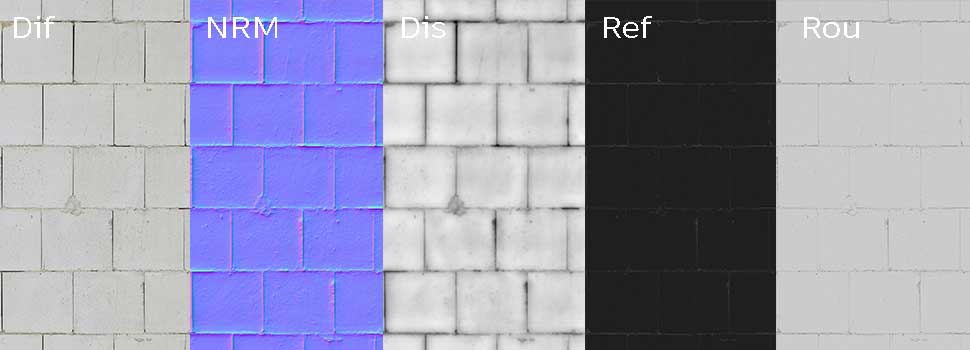
The bricks are large rectangular units with an approximate 1:2.3 height-to-length ratio, visually similar to Hebel or aerated concrete blocks commonly used across Europe for structural partitions and substructure walls.
The mortar joints are intentionally narrow. Vertical joints are filled, while horizontal joints appear tighter and more compressed, creating a subtle linear rhythm across the wall. Both the blocks and mortar are white, resulting in a low-contrast surface that reads as technical and functional rather than decorative.

The matte finish and small surface pores prevent the wall from appearing flat in renders. It communicates “under construction,” “service space,” or “unfinished layer” — ideal for projects where realism depends on showing what sits behind final cladding systems.
Typical Problems This Brick Material Solves
In architectural visualization and Unreal Engine environments, white block walls are often oversimplified. Designers frequently use plain white shaders to represent structural masonry, which leads to:
Unrealistically smooth surfaces
Lack of scale reference
Flat lighting response
Overly clean technical spaces
This seamless brick wall texture introduces micro-detail without overpowering the scene. The subtle pores and tight joints create a believable substrate layer. Instead of looking like a white plane, the wall behaves like real blockwork under natural or artificial lighting.
For production workflows, this avoids spending time manually distressing surfaces that should feel raw and functional.
Practical Use Cases – Brick Material for Unreal Engine
This brick material for Unreal Engine is particularly effective in:
Interior partition walls during construction-phase visualization
Parking structures or service corridors
Basement and storage environments
Industrial or warehouse interiors
Pavement and block-based pedestrian flooring simulations
Because the blocks resemble aerated concrete, the material works well in architectural staging scenes where insulation layers or structural systems are exposed. In game development, it supports believable background architecture in utility areas where a polished façade would feel incorrect.
It is not intended as a final decorative exterior brick; instead, it performs as a structural or secondary surface — which is often what makes a scene feel convincing.
Rendering & Realism Notes – 8K Seamless Brick Texture
The material is delivered as an 8K (8096×8096) PBR seamless brick texture. The high resolution ensures that close-up camera shots retain clarity without visible tiling.
The matte response prevents harsh reflections while still allowing subtle roughness variation. Small surface pores contribute to diffuse breakup, improving light interaction in global illumination setups.
In large-scale walls, the consistent horizontal alignment helps maintain architectural order, while the slight variation in joint thickness avoids mechanical repetition.
Render Engine Compatibility – Unreal, V-Ray, Corona
This white brick texture integrates directly into Unreal Engine using a PBR workflow, allowing fast adjustment of roughness, normal intensity, and overall scale.
In V-Ray and Corona Renderer, the maps follow standard physically based material setups, ensuring predictable light behavior in both interior and exterior lighting scenarios.
The texture set is compatible with any renderer supporting PBR maps, making it suitable for cross-platform production pipelines.
AfterBox Material Controls – Precision Without Rebuilding
Within AfterBox, the ready-made material includes built-in controls designed for production efficiency:
Scale adjustment to match real block dimensions
Color correction for tone and exposure refinement
Roughness, specular, and normal intensity control
One-click tiling and dirt overlay options
Instead of rebuilding shaders for each project, these parameters allow quick adaptation to scene requirements in Unreal Engine, V-Ray, or Corona inside 3ds Max.
All materials are accessible through the lightweight AfterBox application (approximately 16MB), where users can drag and drop them directly into supported render engines.
Access a comprehensive library of brick wall texture materials with an AfterBox subscription.

Save time on material setup
Instead of downloading this texture, use the optimized ready-made material for V-Ray, Corona Renderer (3ds Max) and Unreal Engine available in AfterBox.No manual setup


