


Context & Visual Identity – Irregular Brick Wall Material for Unreal Engine
improvised concrete brick wall Unreal: This material represents a wall that was never properly engineered. Instead of a consistent masonry system, it combines rough cement, pebble stones, and discarded brick fragments into a single uneven surface. The execution feels careless and improvised, as if built with leftover materials rather than deliberate design.

The dominant grey tone comes from the cement base, while scattered brick pieces and stones interrupt the surface in unpredictable ways. This is not a ruined wall; it is a poorly constructed one from the start. In Unreal Engine environments, that distinction matters. It communicates economic hardship, temporary construction, rural improvisation, or conflict-driven building conditions without relying on exaggerated damage effects.
Typical Problems This Material Solves – Damaged Wall Texture Unreal Workflow
When building rural warehouses, war-affected districts, or abandoned industrial zones in Unreal Engine, artists often rely on cracked overlays or decal systems to simulate neglect. The result frequently looks layered and artificial.
This irregular brick wall material Unreal Engine removes the need for heavy post-processing. The structural inconsistency is embedded directly into the texture logic. Cement-heavy areas break continuity, while embedded stones and brick fragments create natural visual noise.
Another challenge in game production is visible tiling across large meshes. Because this texture is seamless and produced at 8K resolution (8096×8096), it holds up across extended surfaces such as hangar walls, perimeter barriers, or village compounds without obvious repetition patterns.
Practical Use Cases – Unreal Engine War Zone Material
The primary use case is real-time environment design in Unreal Engine. It works particularly well for:
-
Rural storage buildings
-
Improvised boundary walls
-
Abandoned industrial sheds
-
Conflict-zone environments
-
Survival and military game levels
-
Post-collapse urban districts
In architectural storytelling visualizations, it can serve as a secondary structure backdrop to contrast refined architecture with neglected surroundings. In cinematic previs or virtual production, it provides believable low-cost construction surfaces without complex shader layering.
Rendering & Realism Notes – 8K PBR Brick and Concrete Texture
The material follows a full PBR workflow, allowing rough cement and embedded fragments to react differently under directional light. The uneven surface creates subtle shadow pockets and micro-contrast variations, which become especially visible in grazing light conditions within Unreal Engine.
Because the base tone is neutral grey, the material integrates easily into different lighting scenarios, whether cold industrial lighting or warm sunset environments. The 8K resolution ensures clarity in close camera passes, supporting first-person gameplay perspectives without surface breakdown.
Render Engine Compatibility – Unreal Engine Focus
This material is optimized for Unreal Engine’s physically based rendering system and integrates directly into standard material setups. It performs consistently under Lumen, dynamic shadows, and baked lighting workflows.
For V-Ray and Corona Renderer, the texture maps translate cleanly into physical materials, preserving roughness balance and tonal accuracy. However, its strongest performance advantage remains within Unreal Engine real-time environments.
Workflow Advantage with AfterBox
All materials are organized inside the lightweight AfterBox application (approximately 16MB). Users can preview and manage assets locally, then drag & drop the ready-made Unreal Engine material directly into their projects.
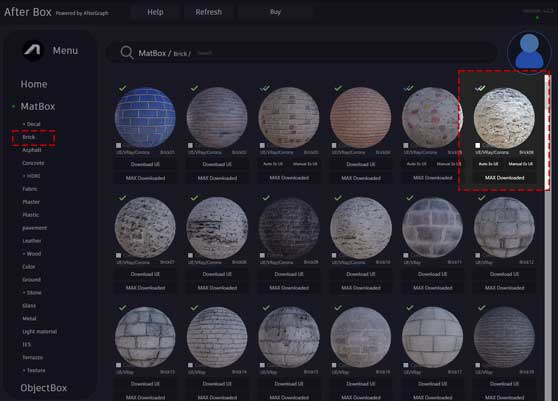
For V-Ray and Corona inside 3ds Max, materials can also be imported without rebuilding shader networks. This maintains consistency between real-time and offline pipelines while reducing repetitive setup steps.

Save time on material setup
Instead of downloading this texture, use the optimized ready-made material for VRay , Corona Renderer (3ds Max) and Unreal Engine available in AfterBox.
No manual setup


