


Architectural Geometry: The Shift to Verticality
In contemporary design, breaking the horizontal tradition of masonry can redefine a building’s silhouette. This Vertical Stacked White Brick PBR offers a clean, graphic aesthetic that emphasizes height and structural order. Featuring elongated, slim brick units oriented vertically, it creates a repetitive linear rhythm that feels far more architectural than standard running bond patterns.

The color profile—a mix of cold chalk white and pale grey—is perfectly balanced by dark charcoal grout lines. This High-Contrast Vertical Brickwork is an essential asset for designers working on minimalist villas or Scandinavian-inspired commercial projects where the wall needs to act as a textured, rhythmic canvas rather than just a simple partition.
Strategic Spatial Implementation
This material excels in environments that demand visual elongation. In large-scale lobbies or narrow hallways, the Modern Slim Brick Facade draws the eye upward, making the ceiling feel higher and the space more expansive. Beyond interior feature walls—such as decorative backdrops for retail counters or TV units—this Monochrome Architectural Masonry is highly effective for modern exterior cladding. Its orderly stack-bond pattern provides a sense of industrial precision, making it a go-to choice for architects aiming for a “clean-industrial” or contemporary minimalist look that remains bright and airy.
The Nuance of Natural Imperfections
While the layout is mathematically precise, the soul of this Vertical Stacked White Brick PBR lies in its microscopic flaws. The surface isn’t a sterile, plastic white; it contains fine mineral grains, subtle tonal shifts, and slight edge irregularities that prevent digital repetition. To elevate the realism, we recommend using the procedural dirt settings to add a layer of environmental history. In an outdoor scene, adding a “vertical wash” of light dust or soot within the recessed dark joints of this High-Contrast Vertical Brickwork will ground the building in its environment. For interior shots, a soft layer of “contact grime” near floor-level junctions ensures the wall looks integrated into the architectural project.
The Importance of Deep Shadows and Contrast
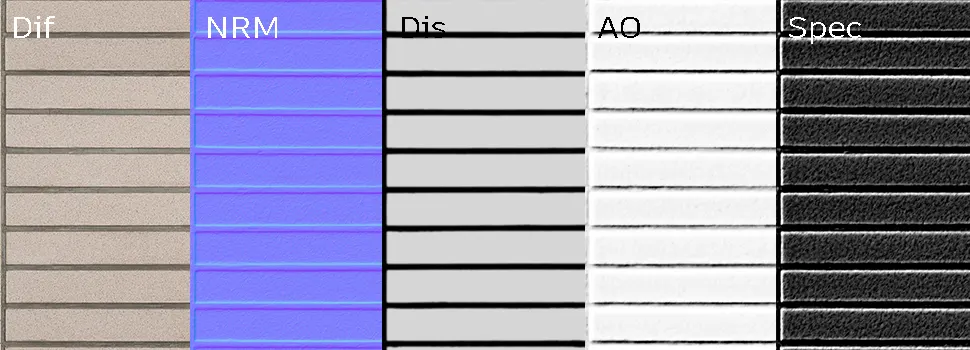
From a rendering perspective, the interaction between the matte brick face and the dark grout is what gives this material its depth. The Linear White Masonry Texture is designed to capture light with low specular response, ensuring the white surfaces don’t “blow out” under direct sunlight. Because the grout is thin and relatively deep, the displacement map is vital; it generates the sharp, vertical shadows that define the Modern Slim Brick Facade. This interplay between the bright brick surface and the shadowed charcoal joint provides a graphic pop that remains legible even from a distance in wide architectural shots.
Engine-Ready PBR Precision
Technical reliability is at the core of this asset. This Vertical Stacked White Brick PBR is calibrated for professional production pipelines, offering full compatibility with Unreal Engine, V-Ray, and Corona Renderer. The texture set includes Diffuse, Specular, Ambient Occlusion, Displacement, and Normal maps, all tiled seamlessly for large-scale surfaces. Whether you are building a real-time environment or a high-end static render, the Monochrome Architectural Masonry settings ensure that the material responds naturally to your lighting setup without the need for manual shader adjustments.
Streamlined Deployment with AfterBox
To keep your creative process fluid, this Linear White Masonry Texture is available for direct import through the AfterBox application. Instead of manually linking high-resolution 5K maps, the 16MB AfterBox tool allows you to drag the material directly into your 3ds Max or Unreal Engine project. This “production-ready” approach means the Modern Slim Brick Facade is set up with correct scale and displacement settings instantly. This allows visualizers to focus on the artistic aspects of the scene while the technical heavy lifting of material creation is handled automatically. Detailed subscription info is available at: https://after-box.com/pricing/
Save time on material setup
Instead of downloading this texture, use the optimized ready-made material for V-Ray , Corona Renderer (3ds Max) and Unreal Engine available in AfterBox.
No manual setup


