


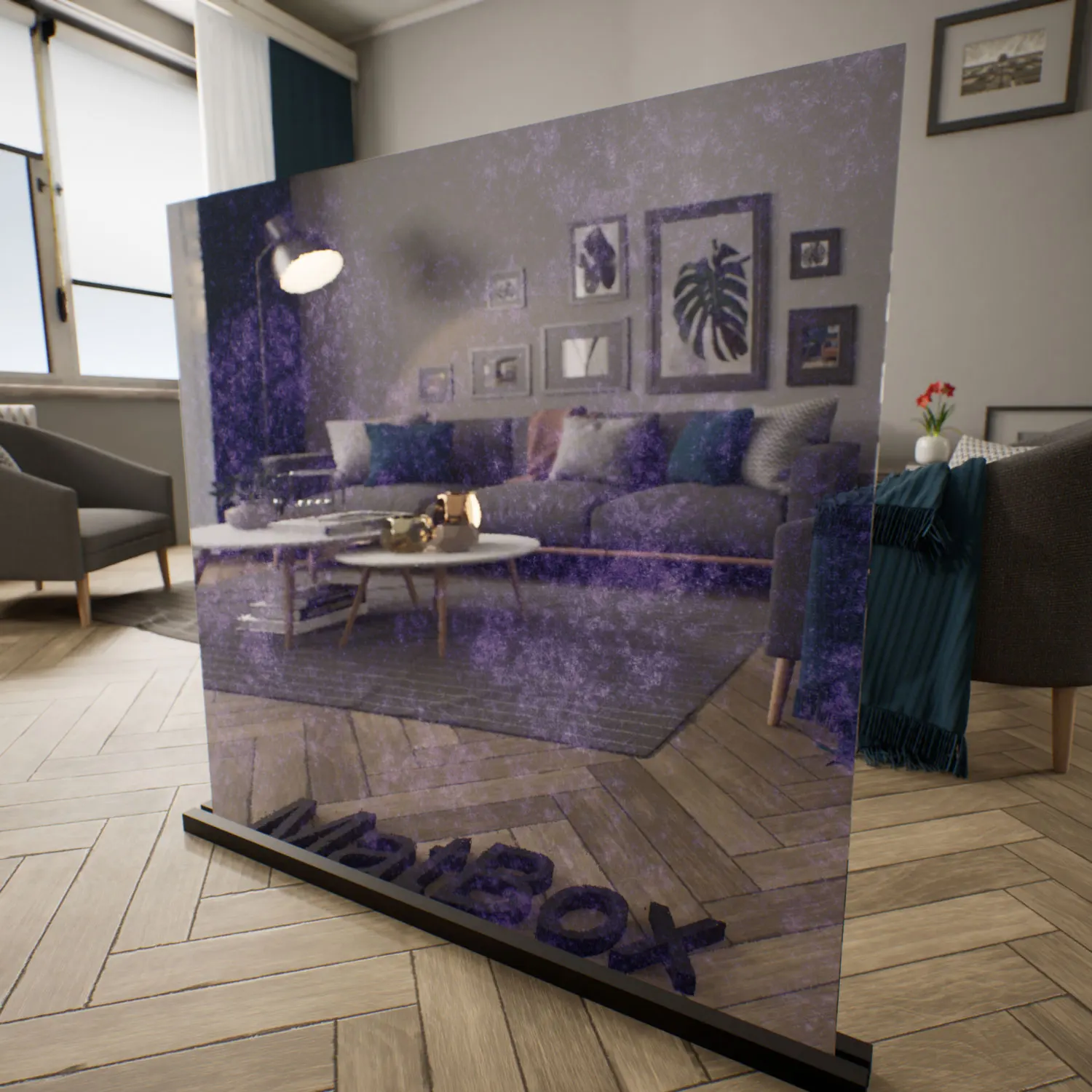
Material & Texture Overview – fluid distorted glass
The fluid distorted glass for Unreal Engine is designed to replicate the visual complexity of hand‑cast or thermally formed glass surfaces. Instead of presenting a flat pane, this material behaves like a thin layer of water suspended vertically—light bends unpredictably, reflections stretch, and background forms dissolve into abstract shapes.

Its color base blends neutral grey with deep cobalt blue, especially within denser distortion zones. Highlights appear silver-white along raised areas, giving the surface a crisp contrast between clarity and turbulence. The result is neither fully transparent nor frosted. It occupies a middle ground where silhouettes remain visible but are transformed into painterly, fluid impressions.
This type of glass integrates naturally into modern and experimental interiors. It pairs well with stone, polished concrete, anodized aluminum, and matte black elements. In restrained color palettes, the fluid distorted glass Unreal Engine material becomes the primary source of visual movement without overwhelming the composition.
Applications in Architecture & Real-Time Scenes
Architects and interior designers often use this style of glass in partitions where privacy is required but daylight must still pass through. In office environments, it softens human silhouettes while preserving brightness. In residential settings, it works effectively for bathroom enclosures, stairwell panels, or feature walls where subtle distortion enhances spatial depth.
For ArchViz artists, the fluid distorted glass Unreal Engine asset introduces motion into otherwise static renders. During slow camera pans, reflections ripple across the surface, adding cinematic value. Game developers can also leverage the fluid distorted glass Unreal Engine material in sci‑fi laboratories, magical portals, or conceptual environments where surfaces should feel alive rather than rigid.
Retail environments benefit as well. Applied to storefront panels or display vitrines, the glass transforms reflections of passersby into abstract forms, subtly attracting attention without relying on emissive effects.
Rendering Behavior & Technical Insights
This asset is built as a seamless PBR material with a strong normal distortion map and calibrated refraction. The organic noise pattern ensures there is no obvious tiling or geometric repetition. Because distortion intensity varies across the surface, highlights and shadows shift differently depending on camera angle and light direction.
Under directional lighting, elongated streaks appear across raised areas. Under diffuse HDR lighting, the glass behaves more like a calm lake surface—subtle, layered, and reflective. The balance between glossiness and distortion ensures reflections remain bright but never perfectly mirrored.
To increase authenticity, consider introducing small imperfections. Slightly reduced distortion density toward the lower edge can simulate gravity during casting. Adding faint mineral residue or barely visible micro‑bubbles inside the volume can break digital perfection and elevate realism in close-up shots.
Ready-Made for Unreal Engine
This ready-made fluid glass for UE is fully prepared for integration inside Unreal Engine. Refraction depth, surface relief intensity, and roughness levels are tuned to respond predictably to both baked and dynamic lighting systems.
Because the shader structure is already configured, you can apply the ready-made fluid glass for UE directly to architectural meshes without building complex node networks. Parameter controls allow quick adjustments to distortion strength or color tint, maintaining efficiency in production pipelines. The fluid distorted glass Unreal Engine setup is optimized to balance realism with performance in real-time environments.
Download & Workflow Integration
The material is accessible through the AfterBox desktop application (approximately 16MB). Once installed, users can browse the asset library and drag the ready-made fluid glass for UE directly into their Unreal project.
This streamlined workflow eliminates repetitive setup tasks and ensures consistent material behavior across scenes. Instead of spending time calibrating refraction and normals, you can immediately focus on lighting, composition, and storytelling.
Subscription and access details are available here:
Save time on material setup
Instead of downloading this texture, use the optimized ready-made material for V-Ray, Corona Renderer (3ds Max) and Unreal Engine available in AfterBox.No manual setup


