






Introducing the Slender Tropical Palm
For artists building coastal environments, finding the right foliage is crucial for achieving a believable sense of place. This slender tropical palm offers a realistic silhouette, resembling a mature coconut palm with its characteristic single, slightly leaning trunk and an open, airy canopy of arching fronds. Because it sits at a tree-scale of 6-10 meters, it is an ideal choice for filling mid-to-background layers in large open-world maps or framing architectural shots in an exterior render. Its deep and olive green tones provide a natural color palette that integrates well with sunlight-drenched environments.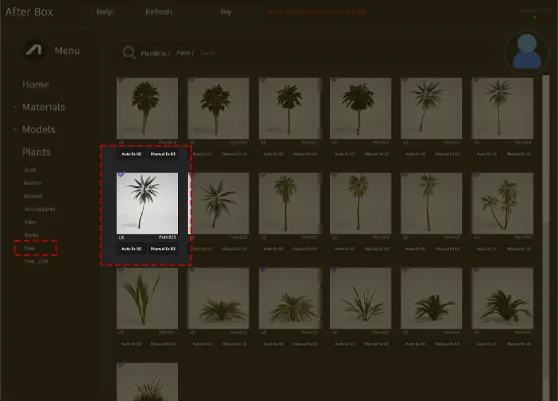
Professional Applications in Architecture and Games
This asset is particularly well-suited for hospitality-focused projects, such as resort master planning or beachfront villa visualizations. In an archviz context, placing this palm around swimming pools or along paved walkways adds immediate authenticity to tropical-themed designs. For game environment artists, this model functions effectively as a staple piece for tropical island settings or vacation resort levels. Its height and lean provide a perfect, natural break in the horizon line when clustered together in coastal scenes. If you are developing a Mediterranean resort, this model pairs exceptionally well with sturdy bird of paradise foliage to create varied, layered planting beds.Environmental Fit and Design Integration
This palm thrives in warm, tropical, or subtropical environments. It is an evergreen species that functions year-round, making it a reliable choice for persistent scenes. In terms of design style, it complements contemporary coastal villas and modern tropical resorts perfectly. It works best when paired with neutral or sandy terrain textures and light-colored masonry like limestone. Avoid using this specific profile for temperate or formal garden scenes, as its slender, leaning aesthetic is deeply tied to seaside or jungle environments.Technical Rendering and Performance
Engineered for modern production pipelines, this asset features a poly count of 3,672 triangles, balancing visual quality with performance. The model is fully Nanite-compatible, which is a major advantage for Unreal Engine 5 projects. Because it is Nanite-ready, you can push your scene scale without the overhead of manually authoring LODs. The geometry of the fronds is designed to capture the interplay of light and shadow, though I recommend adjusting your **subsurface scattering values** on the leaf shaders to ensure the light catches the fronds properly during golden hour shots in the engine.
Managing Density and Variation
To prevent the dreaded “copy-paste” aesthetic, do not scatter this palm uniformly. Utilize the built-in Foliage Tool’s rotation and scaling variance settings. Because the trunk has a naturalistic lean, changing the Z-rotation for every instance creates a much more organic, wind-blown effect across a forest or beach edge. If you are grouping these, try to vary the scale by 10-15% to mimic natural growth competition. Even though the frond patterns are high-quality, high-density scattering benefits from small offsets to ensure that the repeating patterns aren’t obvious from a distance.Drag-and-Drop Foliage Integration
This plant asset is designed for immediate use within any Unreal Engine 5 scene. By utilizing pre-optimized Nanite geometry, the model is ready to be dropped into a level with no technical setup required. This workflow allows architects and environment artists to focus on composition and lighting rather than troubleshooting mesh density or draw calls. It is an essential component for any library focused on rapid, high-quality environment iteration.Workflow and Asset Acquisition
The asset allows for a drag-and-drop workflow that respects the tight timelines of production. You can easily populate complex environments in minutes by utilizing the asset browser, moving from a blank terrain to a fully realized coastal scene with minimal friction. For those needing a broader range of assets for architectural or gaming projects, please visit the pricing page for more information on our full library access.


Save time importing objects
Download this object and hundreds of others from Afterbox software right now and import it into your Unreal Engine project with one click.
