


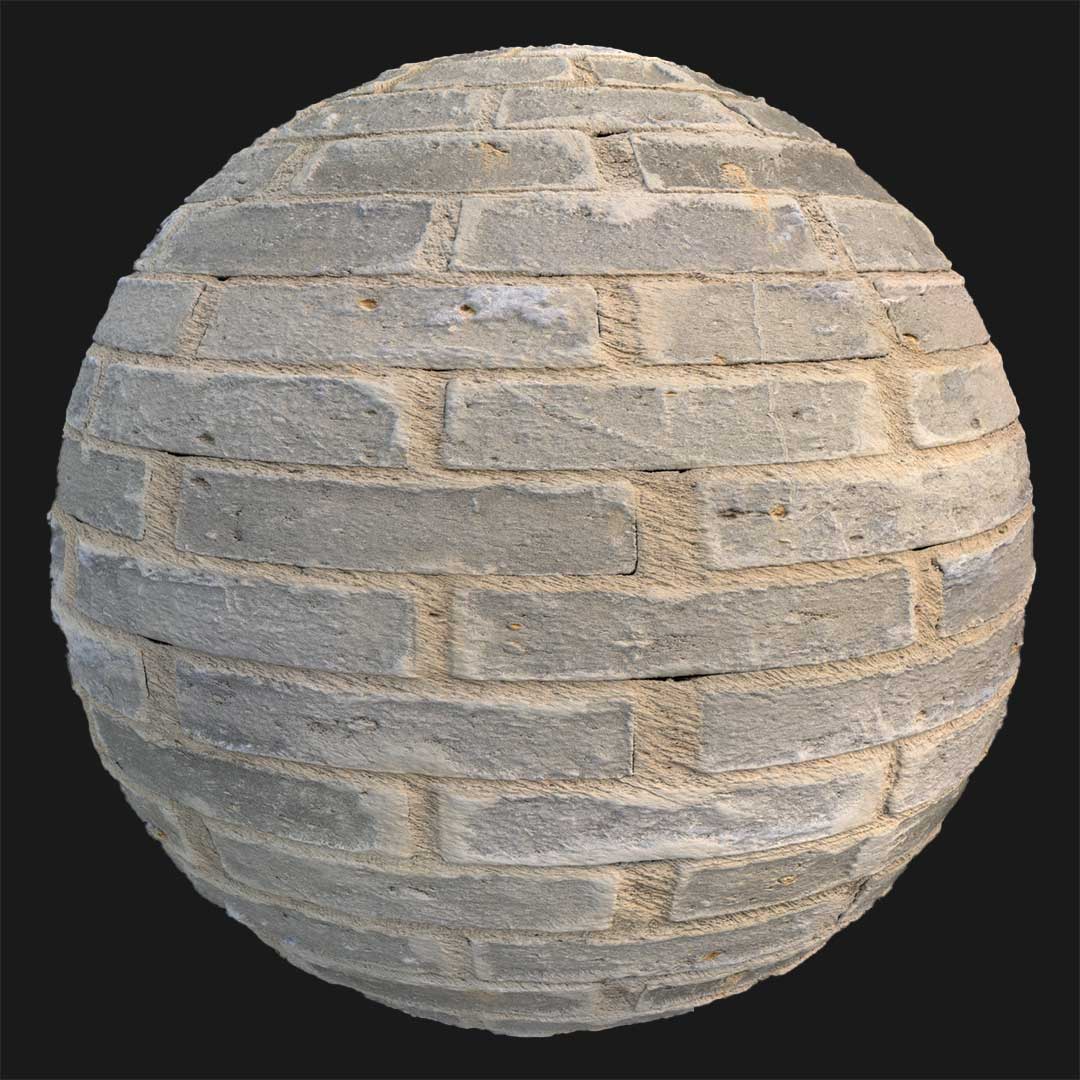
Context & Visual Identity – Mixed Masonry Brick Wall Texture
This mixed masonry brick wall texture represents construction carried out without strict structural discipline.

Instead of a clean brick façade, the surface combines cement patches, embedded stones, and scattered brick fragments. In some areas, a horizontal brick layout is still visible; however, it is partially interrupted by irregular cement application and coarse aggregate.
As a result, the wall reads as improvised rather than engineered. The dominant light cement tone gives the surface a dusty, weather-beaten appearance, while the exposed brick elements introduce subtle tonal contrast. Because the execution feels careless and inconsistent, the material conveys fragility — as if the wall has gradually lost its resistance under harsh environmental conditions.
This type of rough brick wall texture is typically seen in rural storage structures, damaged industrial sheds, or conflict-affected urban zones. Therefore, it is less about architectural precision and more about environmental storytelling.
Typical Problems This Damaged Brick Wall PBR Solves
In production environments, surfaces often look too uniform. Even distressed materials can appear procedurally generated and predictable. Consequently, scenes that require realism may feel artificial.
This damaged brick wall PBR solves that issue by introducing natural irregularity. Because the masonry is visually inconsistent, repetition becomes less noticeable across large surfaces. In addition, the mix of cement, stone, and brick fragments breaks the monotony common in standard brick wall textures.
Another common challenge is representing structural fatigue without fully collapsing geometry. Instead of modeling complex destruction, this material communicates long-term weathering directly through surface detail. As a result, production time is reduced while realism is preserved.
Practical Use Cases – Irregular Brick Wall Texture in Production
This irregular brick wall texture is particularly effective in environments where construction quality is secondary to survival or urgency.
For example, in Unreal Engine game environments, it can represent war-damaged buildings that are still partially standing. Similarly, in architectural visualization, it can be used to depict neglected service areas behind renovated façades.
In rural warehouse simulations, the combination of cement and stone suggests low-budget construction methods. Moreover, for cinematic previs, the porous and uneven surface reacts convincingly under directional lighting, which enhances narrative tension.
Because the texture is seamless and delivered in 8K resolution (8096×8096), it supports both wide environmental shots and close-up camera framing. Therefore, it is suitable for large exterior walls as well as tighter interior compositions.
Rendering & Realism Notes
From a rendering perspective, this rough brick wall texture benefits from its high surface porosity. The uneven cement application creates micro-shadowing under grazing light. Consequently, the wall does not appear flat even without aggressive displacement.
The slight variation between brick fragments and cement patches produces subtle roughness contrast. Under HDRI daylight, the lighter cement reflects diffused light softly; however, under harsh directional lighting, the surface depth becomes more pronounced.
Because the pattern is irregular, tiling artifacts are significantly reduced. As a result, the material maintains credibility in both real-time and offline rendering workflows.
Render Engine Compatibility
This brick wall texture is prepared for efficient use in Unreal Engine, V-Ray, and Corona Renderer. In Unreal Engine, it integrates directly into standard PBR material setups and performs reliably in large-scale environments. Meanwhile, in V-Ray and Corona for 3ds Max, the calibrated maps ensure predictable roughness and reflection behavior. Therefore, artists can integrate the material quickly without extensive shader adjustments. Additionally, the texture maps are compatible with any rendering engine that supports PBR workflows.
Workflow Advantage with AfterBox
All materials are accessible inside the lightweight AfterBox application (approximately 16MB).

Through a drag & drop workflow, users can transfer this brick wall texture directly into Unreal Engine or into V-Ray and Corona within 3ds Max. As a result, manual node construction and repetitive map assignments are minimized.
Access a comprehensive library of brick wall texture materials with an AfterBox subscription.

Save time on material setup
Instead of downloading this texture, use the optimized ready-made material for VRay , Corona Renderer (3ds Max) and Unreal Engine available in AfterBox.
No manual setup


