


Achieving Realism with Weathered Fine-Aggregate Asphalt Pavement
For architectural visualizers and environment artists, the quest for a high-quality, weathered fine-aggregate asphalt pavement often ends with finding the right balance between granular detail and seamless tiling. This PBR material delivers a neutral, mid-toned gray surface that captures the authentic, gritty character of worn street tarmac. Its compact, irregular texture is specifically engineered to provide convincing micro-relief, ensuring that shadows catch the edges of individual aggregate particles even under harsh daylight or low-angle sunlight. By utilizing high-fidelity source data, this asset ensures that your urban environments or residential driveways maintain visual integrity across large-scale scenes.
Practical Applications for Built Environments
Whether you are designing a high-end commercial plaza or a gritty industrial alleyway for a game level, this material adapts to various project scales. It serves as an excellent foundation for:
– Urban infrastructure, including city streets and highway base surfaces.
– Modern landscaping projects, such as pedestrian pathways and public seating areas.
– Residential site plans focusing on driveway and parking bay realism.
– Industrial interior design, where a raw, brutalist flooring aesthetic is desired for lofts or repurposed basement spaces.
Versatility in Architectural Design
This asphalt works exceptionally well within industrial, minimalist, and contemporary design styles. Its neutral color profile and matte finish allow it to anchor a scene without drawing attention away from focal architecture. In terms of material pairings, it acts as a perfect counterpoint to smoother surfaces. Use it alongside brushed concrete walls, rusted weathering steel, or large expanses of structural glass to emphasize the contrast between natural or man-made textures.
Technical Precision for Professional Rendering
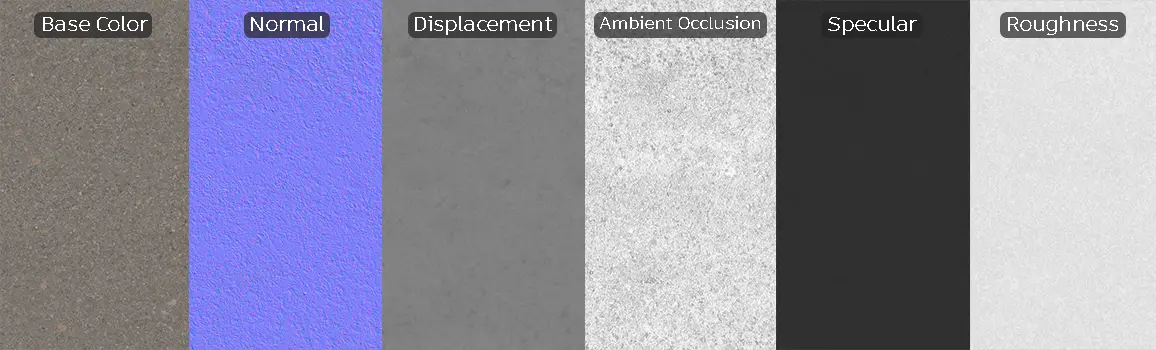
Engineered as a high-resolution 8K PBR asset, this material includes a full suite of maps: Base Color, Specular, Roughness, Normal, Displacement, and Ambient Occlusion. The inclusion of precise displacement maps is critical here; it elevates the surface from a flat image to a physically grounded plane that interacts correctly with light.
One important technical note: while the tiling is optimized to be seamless, avoid placing this material in areas with extreme focal distance close-ups if the camera is parallel to the ground, as you may eventually detect repetition in the aggregate pattern. Instead, utilize slight variations in post-processing or decal overlays to break up the pattern in massive urban plots.
Save Time with AfterBox
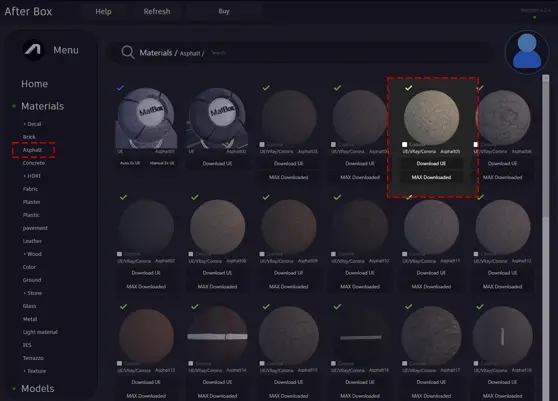
Browse, download and apply materials directly in Unreal Engine, V-Ray and Corona.
Integrating Weathering and Surface Detail
To push your renders toward hyper-realism, supplement this base asphalt with additional dirt or weathering layers. Consider adding vertex paint or localized decal maps to represent pooled water, scattered sand, or tire scuff marks. These subtle imperfections break the uniformity of the pavement and suggest a lived-in, functional space. By layering subtle dust maps into the roughness channel, you can easily simulate the transition from a newly paved road to an aged, high-traffic surface.




Ready-to-Use Material Workflows
The ready-made material versions for V-Ray, Corona Renderer, and Unreal Engine are designed to respect the physical properties of asphalt. Because the assets are pre-configured for these engines, you can bypass the tedious setup of plugging in individual maps. The shaders are optimized to respond accurately to global illumination and reflection probes, ensuring that your ground plane looks correct immediately upon import. This workflow is ideal for fast-paced archviz production environments where meeting deadlines is just as important as image quality.

Streamlining Your Asset Pipeline
By incorporating these premium assets into your library, you significantly reduce the overhead of material creation. Drag-and-drop integration allows for rapid prototyping and iterative design testing. If you are looking to scale your production capabilities, our subscription plans provide consistent access to high-end materials that function reliably across your 3D pipeline. Explore more options for your professional workflow at https://after-box.com/pricing/.
Save time on material setup
Instead of downloading this texture, use the optimized ready-made material for V-Ray , Corona Renderer (3ds Max) and Unreal Engine available in AfterBox.
No manual setup


