


Achieving Realism with Weathered Fine-Aggregate Asphalt
Finding a high-quality, believable road surface is often the deciding factor in the success of an exterior visualization. This weathered fine-aggregate asphalt provides a nuanced, dark brownish-grey surface that avoids the flat, synthetic look of generic textures. With its granular, porous composition, the material captures micro-relief shadows that are essential for establishing depth in street-level hero shots or expansive site plans. By focusing on a natural, high-frequency surface, this asset ensures that your urban environments feel grounded and physically present within the scene.
Implementation Across Diverse Projects
The granular nature of this asphalt makes it an excellent choice for a variety of scales. In exterior site plans, the seamless tiling property allows for large-area coverage without visible pattern repetition. For close-up architectural shots, such as a high-end garage entry or a modern urban walkway, the micro-detail of the aggregate provides a sense of scale and materiality that holds up under scrutiny. Beyond traditional architecture, this material performs exceptionally well in game environments, serving as a base for debris-strewn urban street fragments or aging parking lots in real-time engine projects.Stylistic Integration and Surface Pairing
This asphalt thrives in spaces defined by minimalism and industrial aesthetics. Its dark, neutral charcoal tones provide a strong contrast when paired with raw concrete walls, rusted steel accents, or bright yellow pavement markings. In interior design, it is best suited for high-concept industrial lofts or commercial retail spaces that favor a rugged, brutalist look. While it offers a sophisticated grounded texture, it is generally too coarse for standard residential living areas, where a softer tactile experience is usually preferred.Technical Specifications and Rendering Behavior
To maintain high-frequency detail at close proximity, this 8K PBR material includes a comprehensive set of maps: Base Color, Specular, Roughness, Normal, Displacement, and Ambient Occlusion. The displacement map is particularly critical for this material, as it physically offsets the vertices to recreate the dense, granular surface of real bitumen paving. By utilizing the provided AO and roughness maps, your engine can simulate accurate light absorption across the porous surface, preventing the “plastic” look often found in lower-quality asphalt assets.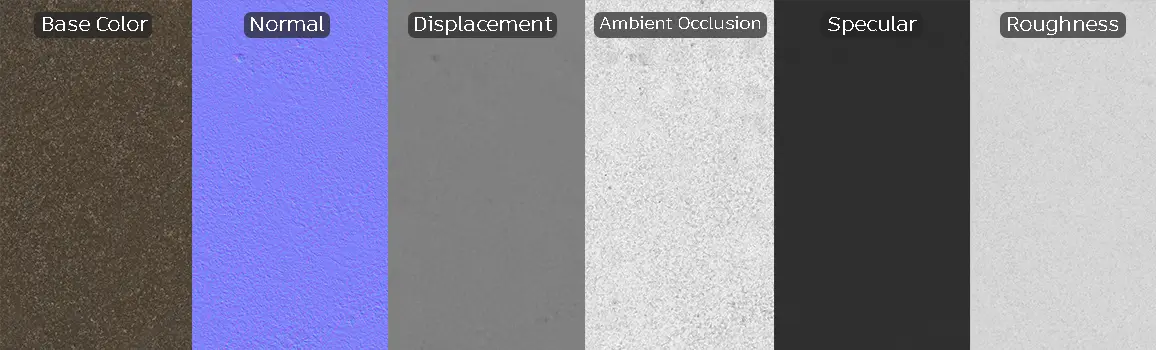
Save Time with AfterBox
Browse, download and apply materials directly in Unreal Engine, V-Ray and Corona.
Enhancing Realism Through Surface Imperfections
While the base texture offers a balanced, weathered aesthetic, layering additional weathering maps can significantly elevate the scene. Adding procedural dirt masks, subtle stains from motor oil, or slight color variations in the aggregate packing can break up the uniformity of the pavement. For urban street scenes, consider blending in subtle grit or gravel debris using a vertex paint workflow to transition from the smooth asphalt to more eroded or naturalistic soil edges.



Streamlined Integration for Professional Workflows
This material is optimized for immediate use in Unreal Engine, V-Ray, and Corona Renderer. By utilizing pre-configured ready-made materials, artists can bypass the time-consuming process of manually linking maps and adjusting material nodes. These assets are calibrated to ensure physically accurate light interaction, meaning you can drop the material into your scene and achieve predictable, high-quality results without intensive material editing.
Accelerating Production with Ready-Made Assets
Efficiency is paramount in high-stakes visualization, and this material is designed to fit directly into your existing library. You can drag and drop these assets into your preferred engine, dramatically reducing the time spent on material setup. By eliminating repetitive technical tasks, you can dedicate more time to lighting and composition, which are the real drivers of emotional resonance in architectural imagery. For teams requiring consistent high-fidelity assets, exploring subscription options provides ongoing access to these production-ready tools. More information about subscription: https://after-box.com/pricing/Save time on material setup
Instead of downloading this texture, use the optimized ready-made material for V-Ray , Corona Renderer (3ds Max) and Unreal Engine available in AfterBox.
No manual setup


