


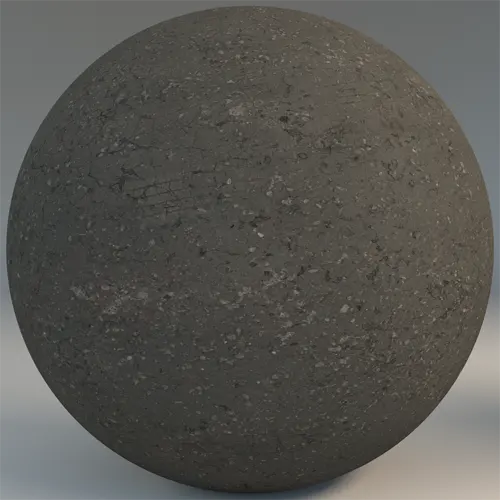
## A Versatile Foundation for Exterior Scenes
Our Free Weathered Fine-Aggregate Asphalt brings a high level of photorealism to your urban and industrial visualizations. This PBR surface features a dense, charcoal-toned granular structure that avoids the artificial, repetitive look often found in lower-quality assets. By incorporating subtle hairline fissures and minor density shifts across the surface, the material mimics the organic wear of real-world pavement, making it an ideal choice for both wide-angle master plan shots and tight, eye-level cinematic compositions.

## Practical Applications for Modern Design
This texture excels in environments where the ground plane needs to ground the architecture without distracting from it. In architectural visualization, it provides a stable, neutral base for pedestrian paths, modern driveways, or contemporary urban plazas. For game environment artists, the asset’s fine grain is perfect for urban sidewalks or abandoned infrastructure where realistic ground detail is essential. While it works beautifully in large-scale exterior scenes, you should avoid using it for high-end interior flooring, as the rugged, industrial nature of the surface is better suited for outdoor transition spaces or utility areas.
## Stylistic Versatility and Texture Pairings
The cool gray tones of this material harmonize perfectly with brutalist concrete facades, rusted corten steel, or the clean lines of brushed aluminum. Its matte finish prevents unsightly specular highlights in direct sunlight, keeping the focus on the surrounding geometry. Whether you are aiming for a minimalist, stark urban look or a lived-in, weathered aesthetic, this asphalt creates a cohesive link between landscape and building elements.
## Precision Engineering in Every Pixel
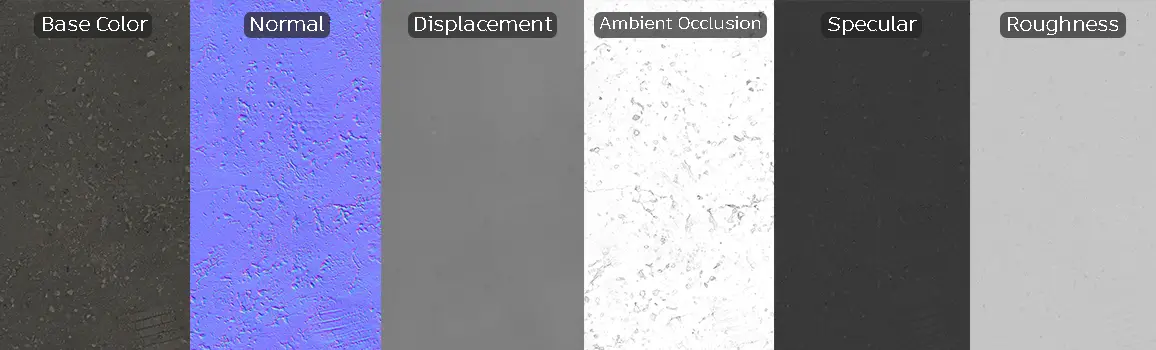
Engineered for high-fidelity workflows, this material includes a full suite of 8K maps: Base Color, Specular, Roughness, Normal, Displacement, and Ambient Occlusion. The inclusion of an accurate Displacement map allows you to leverage real surface geometry at the edges of your view frustum, while the high-resolution Normal map ensures the micro-texture remains sharp even during close-up camera passes. Because the tiling is non-uniform and randomized, it holds up exceptionally well across expansive urban terrains without showing visible seams.
Save Time with AfterBox
Browse, download and apply materials directly in Unreal Engine, V-Ray and Corona.
## Managing Surface Realism
To push the realism of this asphalt even further, consider layering subtle decals such as light dust, localized water puddles, or oil stains directly in your render engine. Because the base material already contains natural imperfections like hairline cracks, adding a layer of grit or debris will integrate it seamlessly into the specific weather conditions of your 3D environment.




## Streamlined Integration for Render Pipelines
This material is designed to be plug-and-play for Unreal Engine, V-Ray, and Corona Renderer. By utilizing the provided PBR map set, you can achieve physically accurate results immediately upon importing. The ready-made assets bypass the tedious setup phase, allowing you to focus on lighting and composition rather than tweaking nodes. These materials are pre-configured to handle standard lighting environments, ensuring that your ground planes respond naturally to Global Illumination and real-time shadows.

## Accelerating Your Rendering Workflow
With the ready-made version of this asphalt, you can simply drag and drop the material onto your geometry. This saves significant time during project development and ensures consistent quality across all your scenes. If you require advanced customization or a broader range of high-quality assets to support your architectural projects, you can find more information about our subscription options at https://after-box.com/pricing/.


Save time on material setup
Instead of downloading this texture, use the optimized ready-made material for VRay , Corona Renderer (3ds Max) and Unreal Engine available in AfterBox.
No manual setup


